Thursday, July 19, 2012

How to steal data from an E-mail


  •       Social Engineering.
  •   Exploiting the vulnerabilities in security.
  •   Keyloggers and browser monitoring.
Social Engineering
Social engineering is a collection of techniques used to manipulate people into performing action or divulging information. While similer to a confidence tricks or simple fraude, the term typically applies to trickey for information gathering or computer system access and in most cases the attacker never comes face-to-face with the victim.
Social engineering is considered a revolutionary art amoung the hacker community, it has proven to be an intresting tool that can be exploited by anyone. All social engineering attackes are based on flaws in human as congnitive biases.Some of these attackes are :
  •  Pretexting.
  •  Phishing.
  •  IVR/Phone Phishing.
  •  Trojan horse.
  •  Road apple

Security Vulnerability
Vulnerabilities are seccurity flaws or holes through which hackers can infiltrate.these holes can provide the hacker access to mailbox even the permission of the user.sometimes the administrator is negligent in patching the vulnerability in security. The hacker makes use of the vulnerability at this point and steals confidential data without the consent of the user.

Keyloggers
A keyloggers is a type os survellance software or spyware that has the capability to record every keystroke you make to a log file,usually encrypted. A keyllogers recoreder can record instant messages,e-mail and any information you type at any time using your keyboard.The log file created by the key loggers can then be sent specified receiver.

Saturday, July 14, 2012

How to hide a folder which no can find even it will not show during searching

Make a new folder in D drive and name it whatever u want i am giving name fans of hackers
so..........
go to RUN then type CMD hit enter now a DOS Window will open type there

" attrib +s +h D:/filename " without the quots

now hit enter now go into ur D drive there u will see that ur folder is hidden now try all the way to find it like TOOL menu SEARCHING etc.......
it will never show without using this method to get it back open CMD again and type

"attrib -s -h D:/filename " without the quots

now u will get it back enjoy and save ur data where ever u want

u can also select any drive so just change the directory. :)

Friday, June 29, 2012

Uninstall Backtrack 5 Dual Boot Win 7


it’s not uninstall actually, hha just simply delete it.
after a month i tried to use backtrack 5, i found out that my disk space allocated for backtrack 5 was nearly empty, 10 GB was too small. So i’d like to add new disk space, but i haven’t found the way to do it. I came up with uncool steps.
1. Remove old backtrack installation
2. Reinstall backtrack with new disk space allocation
to remove backtrack installation, which is dual booted with windows 7, i have to make sure my windows 7 can still work well. after googling, i got the message to do fixmbr to recover windows 7 boot manager. so here are the steps.
A. Fixing windows 7 boot manager
1. prepare your win7 installation disk (dvd/usb), plug it in.
2. start your computer, set the boot priority from bios setting (first boot usb, or cd/dvd room)
3. when windows 7 installation comes up, choose repair
4. choose repair this computer with recovery tool, click next
5. choose command prompt
6. enter this command
[php]bootRec.exe /fixmbr[/php]
7. reboot your computer
B. Remove backtrack
1. now your computer should start the win 7 automatically
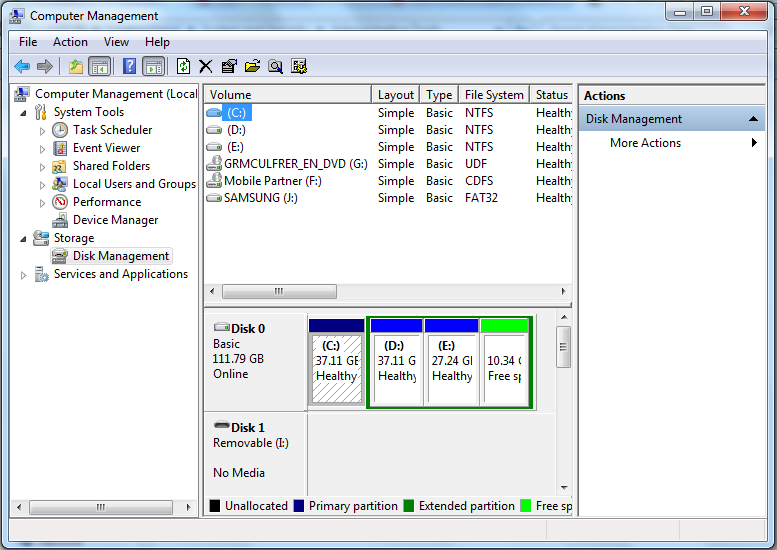
2. go to control panel > System and Security > Administrative Tools > Computer Management > choose Disk Management (under storage properties)
3. u will see clearly your computer partitions, delete your backtrack partition by right click > delete Volume
4. after it is deleted you will have new disk space and u can expand your other windows partition.
partition manager
computer management windows 7

Wednesday, May 30, 2012

Slowly but surely the Web warms up to new protocol


A number of Internet Service Providers (ISPs), hardware makers and websites, including a few from India, will start running IPv6, a new generation Internet protocol, permanently from June 6. It is part of a global effort to move away from the IPv4 regime that now rules the cyberspace.
But the ‘World IPv6 Launch,' being spearheaded by the global non-profit organisation, Internet Society, will make little difference to most users for, they will most probably continue to use IPv4 by default, as the switch to IPv6 is possible only when their computers, the networks and the content and service providers are ready for it.
Version 4 is made up of a set of numbers that helps to identify web addresses, facilitating communication from one point to the other. With the rapid expansion of Internet, the sets of numbers that could be used as digital addresses started getting exhausted. This necessitated a new version that offers an almost inexhaustible address pool.

Tuesday, May 15, 2012


Using the SysKey utility

To launch the SysKey utility, type “syskey” at the Start Search prompt of Windows Vista or Windows 7, or use the “run” option of the Windows XP Start Menu.
SysKey
To move the SAM encryption key off the computer, you have, click “Store Startup Key on Floppy Disk.” The tool claims that you will need to insert a floppy disk on startup, which is not really true. Modern computers no longer have floppies, and this storage medium isn’t reliable enough anyway. You can also store the SAM encryption key on a USB flash drive.
Configure Ssyskey
However, the USB stick has to be mounted on drive “A:”. You can assign this drive letter to your thumb drive in Windows Disk Management. If the drive letter A is not available, you have to first disable the floppy disk in the computer BIOS.
The SysKey utility will then allow you to store a file with the name StartKey.Key on your USB drive. This file contains the SAM encryption key. Without it, you won’t be able to log on in the future. Thus, whenever you boot up your computer, you have to insert this USB stick. Windows will always automatically load the encryption key from drive A:, and if you set a password with the SysKey utility, you will have to enter this password whenever you boot up the computer.
SysKey startup key SysKey Startup password

What extra security does the SysKey utility bring?

First of all, neither storing the SAM encryption key on an external drive nor protecting it with a password can prevent tools such Kon-Boot or the Trinity Rescue Kit from manipulating the SAM database. These tools are still able to set an empty password on all accounts. However, after such a manipulation, it is not possible to boot up Windows without the encryption key on the USB drive or without the startup password.
Hence, this method will prevent the majority of wannabe hackers from logging on to the computer with administrator privileges. It won’t, however, stop real hackers. As long as an attacker has physical access to an unencrypted system drive, everything is doable because every system file can be replaced as I demonstrated in my article about the Sticky Key trick. By the way, this trick will no longer work if you secure the SAM encryption key because an attacker wouldn’t be able to reach the logon screen without access to the encryption key.
So does it make sense to protect all your PCs with the SysKey utility? I don’t think so. The fact that the tool tries to store the encryption key on a floppy disk shows that this method is a bit outdated. It is too much hassle for your users to mess with a USB stick or to use an additional password compared to the extra protection the tool offers.
However, I think, the SysKey utility is still useful in some environments. For instance, you can use the tool to protect laptops or servers where you don’t want to disable booting from external drives or where many people would have the time to open the PC and access the system drive. It might also make sense to protect your own PC this way. Wouldn’t it be embarrassing if your colleague’s eight-year-old daughter hacks your PC while you take a coffee break?
The point is that 99% of all kids out there who call themselves hackers know about Kon-Boot and the myriad of similar tools, but they don’t know how to handle SysKey. SysKey was originally introduced to prevent hackers from cracking passwords in the SAM database with brute force attacks. And popular hacking tools such SAMInside still can’t handle a protected SAM encryption key.
Of course, SysKey can’t stop the bad guys and gals disguised with vacuum cleaners from shoving some nasty rootkits on the system drives of your PCs. But BitLocker will do the job in 99.999% of 

Thursday, March 15, 2012

Syskey


SYSKEY is a utility that encrypts the hashed password information in a SAM database in a Windows system using a 128-bit encryption key.
SYSKEY was an optional feature added in Windows NT 4.0 SP3. It was meant to protect against offline password cracking attacks so that the SAM database would still be secure even if someone had a copy of it. However, in December 1999, a security team from BindView found a security hole in SYSKEY which indicates that a certain form of cryptanalytic attack is possible offline. A brute force attack then appeared to be possible.
Microsoft later collaborated with BindView to issue a fix for the problem (dubbed the 'Syskey Bug') which appears to have been settled and SYSKEY has been pronounced secure enough to resist brute force attack.


Tuesday, March 13, 2012

ORKUT/GMAIL ID HACKING WITH SOCIAL SOCIAL ENGINEERING : HACK ORKUT ACCOUNT


This is one of the best way to hack ur friends orkut and gmail account in simple way . let me make it clear now how social engineering work with this practical example.
To hack ur friends account first of all u need to become friends in orkut .
then follow this details step by step.
1.select your victim and start chatting with him.
2.ask his mob no and tell him that ur orkut acc need varification.
3.if he gave u no like 9856.......57 .
4.now take him victim id from visit his profile like id is subedh@gmail.com

and paste his id and submit it for continue .
6. now paste his no like 9856....57 into "get verification code on my phone" and continue it.
7.now tel ur victim to give ur verification code.
8.and change pass 

80% people give his no they thinks u need a verification.

happy hacking and don't fall such a stupid social engineering .. My Dear :)